What’s New
This release delivers major improvements across financial reporting, barcode-driven inventory operations, tax compliance, and system usability. It enhances accuracy in multi-currency accounting, strengthens regulatory alignment (including BIR requirements), and improves user control across key workflows such as reporting, journals, stock management, and system administration.
May 21, 2026
✨Key Feature
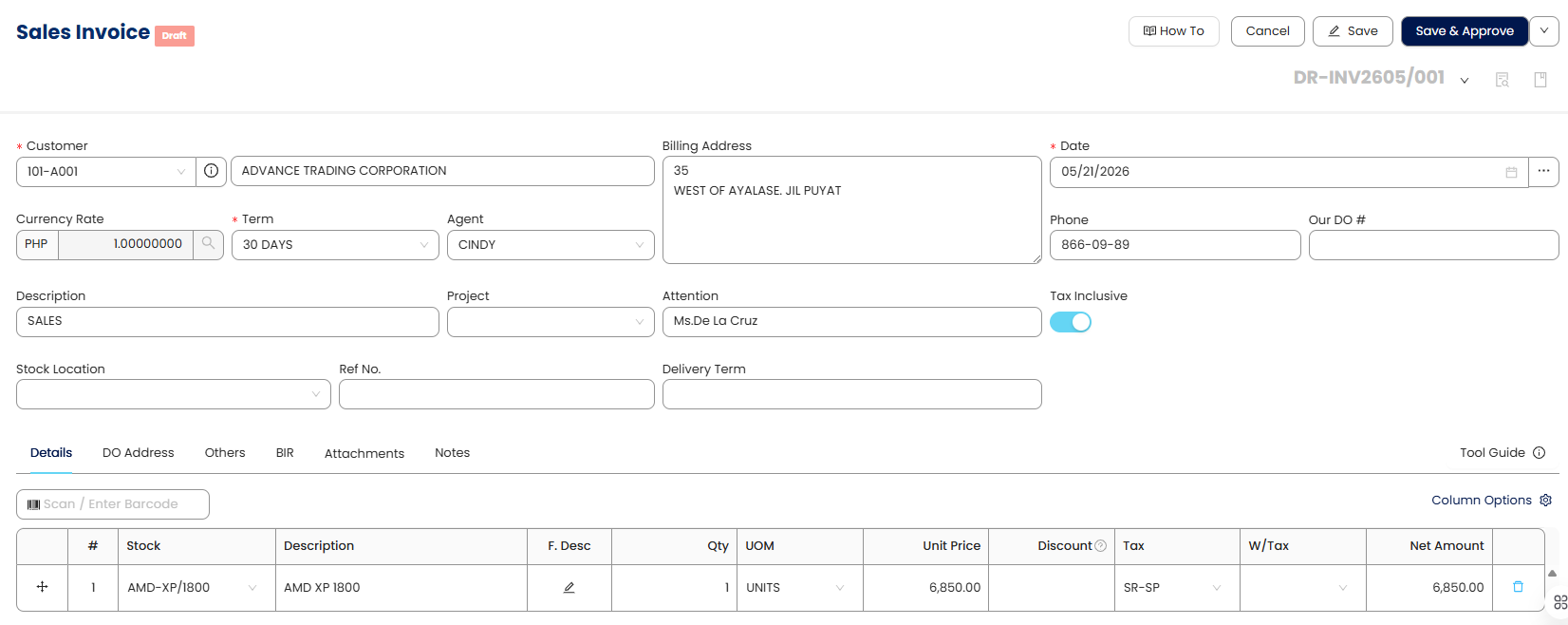
1. Park & Post Feature
This feature allows users to temporarily save (park) a transaction and resume it later before final posting. It helps users manage incomplete or pending entries without losing progress or disrupting their workflow. By enabling review and adjustments prior to posting, it reduces the risk of errors in transaction processing. This improves flexibility and efficiency, especially during peak operational periods where transactions need to be managed in stages.
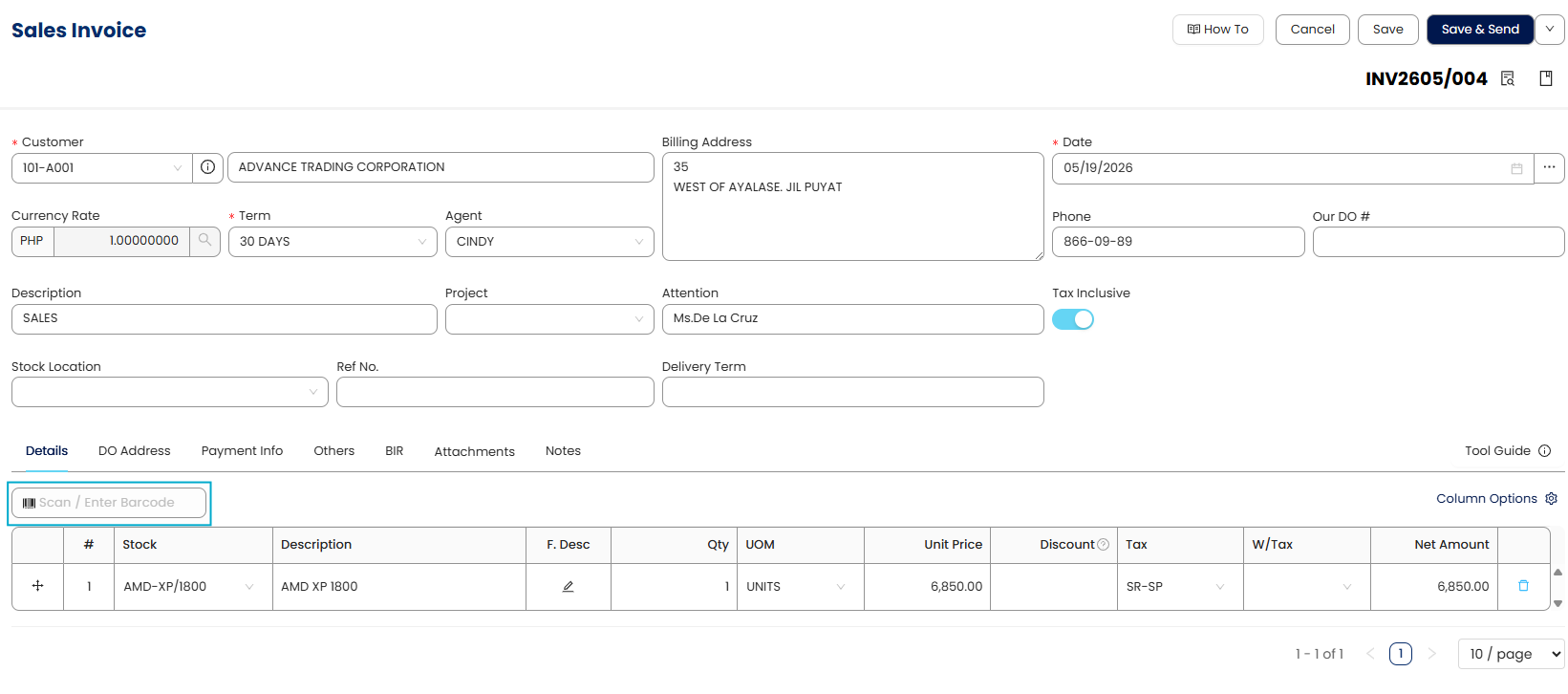
2. Barcode Module
This feature enables users to maintain unique barcodes for each item and capture them through barcode scanning during transactions. Additionally, users can now print barcodes directly from Stock & Service Maintenance, improving item traceability and operational readiness. It enhances speed and accuracy in inventory handling by reducing manual input. Overall, it modernizes inventory management and supports more efficient stock operations.
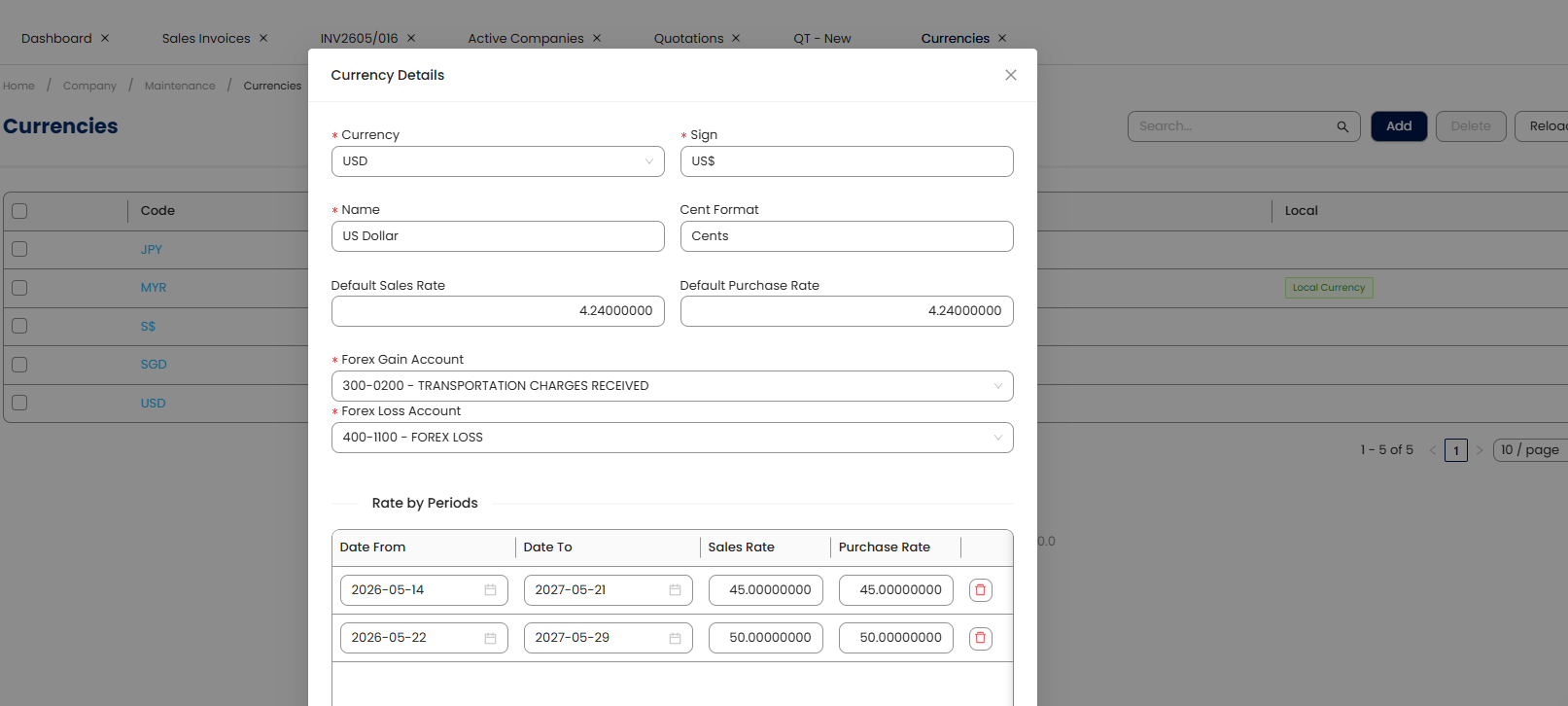
3. Currency Rate per Period
✨General Ledger
4. Foreign Currency General Ledger Report
A General Ledger report for foreign currency accounts has been introduced. This improves multi-currency financial reporting. It provides clearer insights into foreign transactions. The enhancement strengthens global accounting support.
5. Journal Voucher Enhanced with Column Customization
A Column Chooser has been added to the Journal Voucher form for better user personalization. Users can now configure visible fields based on their workflow needs. This improves usability and reduces clutter in accounting entries. It allows more efficient voucher management.
6. General Journal Enhanced with Foreign Currency Format
Foreign debit and credit fields are now available in the General Journal report designer. This improves visibility of foreign currency transactions. It supports better financial analysis and reconciliation. The enhancement benefits multi-currency accounting workflows.
7. Receipt Journal Inquiry Added
Receipt Journals now include an Inquiry view. This improves transaction traceability. It simplifies receipt analysis. The update enhances accounting transparency.
8. Invoice Journal Inquiry
An Inquiry view has been added for Invoice Journals. This improves data accessibility. It allows users to analyze journal entries more easily. The update enhances reporting efficiency.
9. Credit Note Journal Inquiry
An Inquiry view is now available for Customer Credit Notes Journals. This improves visibility of credit transactions. It enhances financial analysis capabilities. The enhancement supports better reconciliation.
✨Account Receivable
10. Refund Entry Knockoff Tables Enhancement
Refund Entry has been enhanced with improved customer and supplier knockoff tables. This improves reconciliation accuracy. It simplifies refund processing. The enhancement strengthens financial workflows.
11. Statement of Account Enhanced with Matching Details
The Statement of Account now includes matching details for better reconciliation. This improves clarity in outstanding balances. It reduces manual cross-checking. The enhancement strengthens customer account management.
✨Stock
12. Stock Availability Report Consolidation
Stock Location Available Balance Report has been merged into the Stock Available Balance Report. This reduces duplication of reports. It simplifies reporting structure. The update improves usability.
13. Stock Take Checklist Report
A new Stock Take Checklist Report has been introduced. This helps users organize and validate inventory counts. It improves stock audit efficiency. The enhancement supports better warehouse control.
✨Tax & Other Localization
14. BIR Form 0619F
BIR Form 0619F is now available in the system. This supports updated tax reporting requirements. It ensures compliance with regulatory standards. The enhancement expands tax form coverage.
15. Enhanced BIR Form 2307 Print Accuracy
Payee branch code is now included in printed BIR Form 2307. This ensures completeness of required tax documentation. It reduces manual corrections before submission. The enhancement improves compliance accuracy.
16. BIR Form Entry Control Improvement
Lines 16 and 17 in BIR forms are now manually input instead of auto-calculated. This allows greater user control over sensitive data. It improves reporting accuracy in edge cases. The update enhances compliance flexibility.
17. QAP Generation CSV Export
Users can now export QAP generation data to CSV format. This improves data portability and external analysis. It reduces manual extraction effort. The enhancement supports better reporting workflows.
18. Updated Cheque Printing Format for Compliance
Cheque printing format has been updated to align with PCHC and Philippine guidelines. This ensures compliance with banking standards. It reduces rejection risks for printed cheques. The enhancement improves financial document acceptance.
✨Other Enhancements
19. Improved User Security via Re-Invite Email Verification
The system now sends an email verification when users are re-invited. This ensures account authenticity and prevents unauthorized access. It strengthens onboarding security processes. The update enhances overall user management safety.
20. Improved Stock & Service List View Column Naming
The classification column name has been updated for better clarity in Stock & Service List View. This improves user understanding of item categorization. It reduces confusion during inventory review. The enhancement improves UI consistency.
21. Inquiry Interface Clean-Up for List Views
Extra lines in List View and Inquiry screens have been removed. This results in a cleaner and more readable interface. It improves user experience during data navigation. The update enhances UI polish and consistency.
22. Company Profile BIR Tab Field Reorganization
Fields in the Company Profile > BIR Tab have been rearranged for better logical grouping. This improves ease of navigation and data entry. It reduces user confusion. The enhancement improves form usability.
23. Updated CAS Registration Labeling
The label “BIR CAS Registered” has been renamed to “BIR CAS/CBA Registered.” This improves clarity and regulatory alignment. It ensures more accurate terminology usage. The update enhances compliance communication.
24. Default User Settings Enhanced with Email Visibility
User selection in default settings now displays email addresses. This helps users identify accounts more easily. It reduces selection errors in multi-user environments. The enhancement improves usability.
26. Dashboard Default View Optimization
Business Overview is now the default dashboard view in QCA. This provides users with immediate access to key insights. It improves decision-making efficiency. The update enhances dashboard usability.
27. Support Access Rights Column Added
A new access rights column has been added in QNE Support Access. This improves visibility of user permissions. It enhances administrative control. The update strengthens security management.
28. Bank Balance Visibility Control
Users can now control bank balance visibility in transaction forms. This improves data privacy and role-based access. It enhances financial data security. The update strengthens permission controls.
29. Audit Trail Listing with Modified Detail Format
Audit Trail Listing now includes a detailed preview of modified records. This improves traceability of system changes. It enhances compliance and audit readiness. The update strengthens system accountability.
30. Chart of Accounts Format
Additional fields such as parent code, DR/CR, account type, and cash flow type have been added to the Chart of Accounts preview. This improves financial structure visibility. It helps users better understand account hierarchies. The update enhances financial clarity.
31. Column Chooser Improvement
Column Chooser functionality has been expanded to additional modules, allowing users to customize visible fields in key data views. This improves flexibility in how users interact with data grids. It reduces clutter and enhances workflow efficiency. The update supports a more personalized user experience.
- First, Middle, Last Name in TIN Library
- Customer and Supplier Column in Stock Inquiry
32. Report Designer Improvement
Multiple report designer enhancements have been introduced across financial modules, adding new fields for improved reporting depth and accuracy. These updates provide users with more granular financial, supplier, and transaction-level visibility. They enhance report customization and reduce dependency on external data processing. Overall, this strengthens financial reporting precision and flexibility.
- Detail Stock Location Code and Detail Location Name Field in Sales and Purchase Transaction
- Currency Rate in Purchase Requisition and Goods Received Note
- Foreign Debit and Credit Field in General Journal
- Email, Phone, and Attention Fields in Cash Sales Register
- Supplier TIN and BRN/Reg No. Fields in All Purchase Register
- Due Date Data Field in Customer & Supplier Aging
- Outstanding Amount in Words in Sales and Purchase Transaction Preview
- Supplier Invoice No. Field in Stock Ledger
- Local Amount Field in Bank Reconciliation
- Global Ref No in Bill Listing
Was this article helpful?
That’s Great!
Thank you for your feedback
Sorry! We couldn't be helpful
Thank you for your feedback
Feedback sent
We appreciate your effort and will try to fix the article