Overview:
The Receipt Voucher module is used to record incoming payments that are posted directly to the General Ledger and not linked to Sales Invoices or the Accounts Receivable (AR) module.
This is typically used for receipts do not follow the standard customer invoicing and collection process.
By recording receipt vouchers, businesses ensure that all incoming funds are properly captured and reflected in financial records such as the General Ledger and Cash Flow Statement.
For transactions requiring official receipt details or tax reporting, relevant payer information may be captured using the BIR Info field.
When to Use Receipt Voucher
Use Receipt Voucher in the following scenarios:
Employee cash returns or expense recoveries
Petty cash replenishments or internal fund transfers
Owner or shareholder capital contributions
Refunds or rebates received from suppliers or service providers
Interest income or bank credits
Insurance claims or recoveries
Donations or grants received
One-time or walk-in receipts where no invoice is issued
When NOT to Use Receipt Voucher
Do not use Receipt Voucher when:
The receipt is intended to settle a Sales Invoice / Customer Invoice
The transaction should be recorded through the Accounts Receivable (AR) module
You need to track outstanding customer balances
Prerequisites:
Before recording a Receipt Voucher, ensure the following:
Relevant General Ledger accounts are properly set up
Cash or Bank accounts are available for selection
User has the necessary access rights and permissions
Required BIR Info (if applicable) are properly maintained
Scenario:
A company received ₱5,000 as a direct cash donation for a company-sponsored outreach program on May 20, 2026. Since the transaction is not linked to a Sales Invoice or processed through Accounts Receivable, the receipt will be recorded using the Receipt Voucher module.
Procedure:
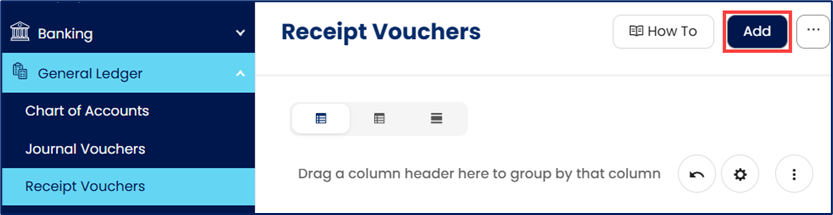
Go to General Ledger > Receipt Vouchers, then click Add.
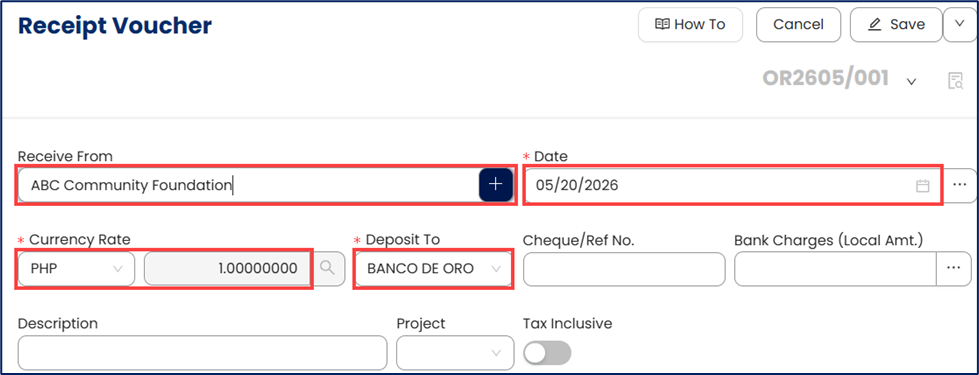
Enter header information:
Receive From – Select an existing payer record or enter a name for one-time or walk-in payers.
Date
Currency Rate
Deposit To – Select the receiving cash or bank account.
Optional fields:
Cheque/Ref No. – Enter reference details if applicable
Bank Charges (Local Amt.) – Enter any associated bank charges
Description – Provide a brief explanation
Project – Assign the transaction to a project if applicable
Tax Inclusive – Toggle ON if amounts already include tax
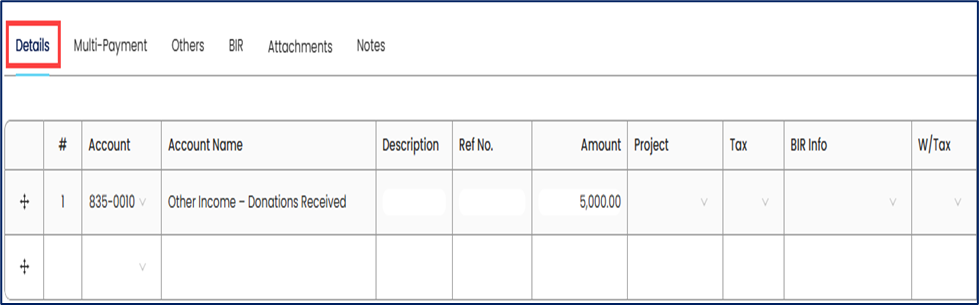
Under the Details tab, allocate the received amount:
Account – Select the appropriate ledger account
Description – Enter line description
Ref. No. – Supporting reference (if applicable)
Amount – Enter the allocated amount
Project – Assign if applicable
Tax – Select tax treatment if required
BIR Info (When Applicable) – Use this field only if the transaction requires official receipt details or tax reporting information.
Applicable when:
Issuing an official receipt
Recording VAT-able or tax-reportable receipts
The payer is not maintained in a customer or supplier master record
Not required when:
Recording internal transfers
Capturing non-taxable receipts without reporting requirements
The payer information is already maintained in a linked master record
BIR Info records are maintained in the TIN Library under the BIR module. You may create or select an existing BIR Info record when needed for one-time or non-master-record transactions.
Note: Ensure that the information provided is accurate if used for reporting or document generation.
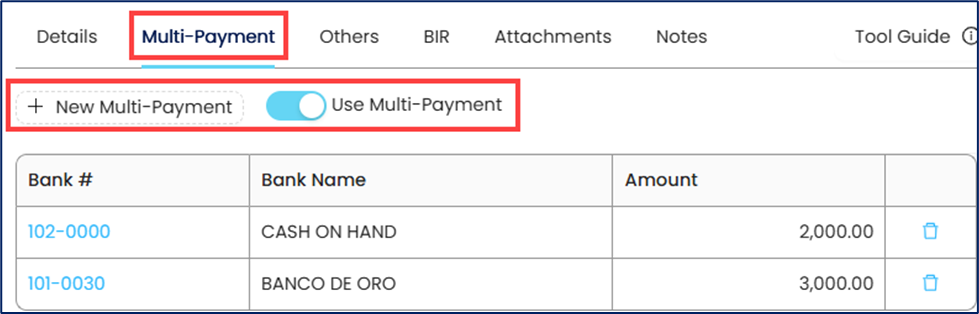
(Optional) Use Multi-Payment
If the receipt is collected through multiple payment methods:
Go to the Multi-Payment tab
Allocate amounts across payment types (e.g., cash, bank transfer, cheque)
Ensure totals match the receipt amount
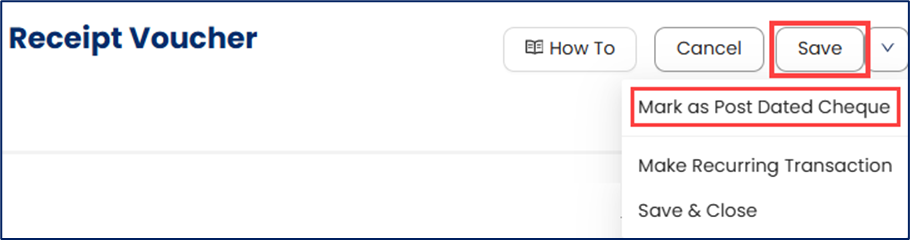
Click Save to record the receipt voucher.
Optional:
Mark as Post Dated Cheque if applicable
Application:
Receipt Vouchers are commonly used to record incoming funds that are posted directly to the General Ledger without creating or settling Accounts Receivable transactions.
Common applications include:
Recording donations, grants, or sponsorship funds
Capturing employee reimbursements and miscellaneous recoveries
Recording owner or shareholder capital contributions
Posting bank interest income or direct bank credits
Recording supplier refunds, rebates, or insurance recoveries
Tracking one-time receipts that do not require customer account management
Allocating receipts directly to specific accounts, projects, or cost centers for reporting purposes
System Scope: QNE AI Cloud Accounting / N3 AI Accounting
Was this article helpful?
That’s Great!
Thank you for your feedback
Sorry! We couldn't be helpful
Thank you for your feedback
Feedback sent
We appreciate your effort and will try to fix the article