Overview:
A password is very important to maintain an account's security. This must not be compromised nor given to others.
If the password seems to be weak and/or compromised, changing it should be done.
Scenario:
Change existing password.
Procedure:
Open Account Settings
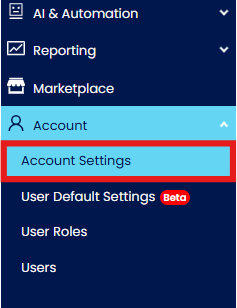
Option 1#. Go to Accounts > Account Settings.
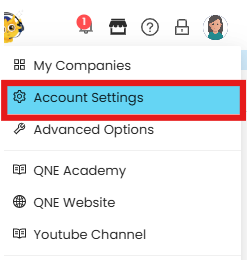
Option #2. Hover the mouse pointer over the icon and Select Account Settings.
Go to Security Settings.

Application:
Click ‘Change Password’.

Enter Old, New Password, and Confirm Password. Once done, click ‘Save’.
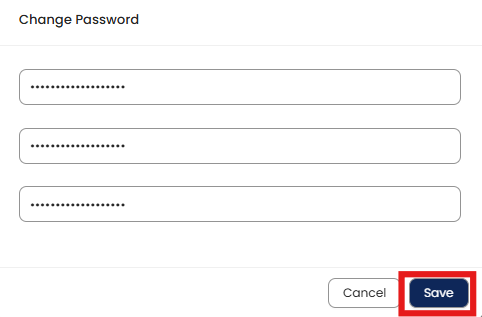
A message will appear that the password has been successfully changed.

System Scope: N3 AI Accounting (formerly QNE AI Cloud Accounting)
Was this article helpful?
That’s Great!
Thank you for your feedback
Sorry! We couldn't be helpful
Thank you for your feedback
Feedback sent
We appreciate your effort and will try to fix the article